
When a new medical facility is planned, there is a need for staff members of various job roles and levels. For each of these roles, there are several different classifications for staff. Each of these classification groups have their respective advantages and disadvantages in terms of cost, productivity, new ideas, and other characteristics. Some of these characteristics have a continuous range of values, which differ for each type of job role. In addition, there are boundary conditions characteristics, which only have binary values (True/False), that also limit the proportion for each classification group. While the number of classifications is not limited, this publication will consider examples with three primary classifications for staff: early career hires, experienced hires, and (experienced) transfers. This article details a method for using these metrics and boundary conditions to optimize the staffing using a visualization approach. While the equations for the metrics and boundary conditions can be solved directly and we show how that can be done, they do not answer how the optimum solution is obtained in the way that visualizations can. Since each facility and location may have its own unique requirements, this article discusses general principles and mathematical processes rather than exact prescriptions.
| Published in | Journal of Human Resource Management (Volume 14, Issue 2) |
| DOI | 10.11648/j.jhrm.20261402.15 |
| Page(s) | 144-157 |
| Creative Commons |
This is an Open Access article, distributed under the terms of the Creative Commons Attribution 4.0 International License (http://creativecommons.org/licenses/by/4.0/), which permits unrestricted use, distribution and reproduction in any medium or format, provided the original work is properly cited. |
| Copyright |
Copyright © The Author(s), 2026. Published by Science Publishing Group |
Staffing, New Facility, Early Career, Experienced Career, Transfers, Staff Reductions, Facility Expansion
Vertex | X | Y |
|---|---|---|
Early Career Hire | 0.0 | 0.0 |
Experienced Hire | 1.0 | 0.0 |
Transfer | 0.5 |
|
Interior Point |
|
|
Vertex | Height | Area | Relative Area |
|---|---|---|---|
Early Career Hire, ε |
|
|
|
Experienced Hire, χ |
|
|
|
Transfer, τ |
|
|
|
Totals |
|
| 1 |
Registered Nurse | Human Resources Business Partner | ||||||||
|---|---|---|---|---|---|---|---|---|---|
Weight | EC Hire | Exp. Hire | Xfer | Weight | EC Hire | Exp. Hire | Xfer | ||
Metric | Experience | 40% | ML | MH | MH | 60% | L | MH | M |
Cost | 30% | ML | H | H | 15% | M | MH | H | |
Productivity | 20% | M | MH | H | 5% | ML | MH | MH | |
Synergy (Equation (7)) | 10% | 1 | 1 | 1 | 20% | 1 | 2 | 2 | |
Boundary Condition | Force All Types | EC: ≥ 10% and ≤ 50% Others: ≥ 10% and ≤ 80% | All: ≥ 10% and ≤ 50% | ||||||
Mentor Needed | EC ≤ Xfer + 0.5 * Exp Exp. ≤ 4 * Xfer | NONE | |||||||
Employee Type: EC — Early Career, Exp. — Experienced, Xfer – Transfer Metric Scale: Low (10%), Medium-Low (30%), Medium (50%), Medium-High (70%), High (90%) | |||||||||
E or EC | Early Career Candidates |
ENT | Ear Nose and Throat Physician |
H | High Metric Value (90%) |
HRBP | Human Resources Business Partner |
L | Low Metric Value (10%) |
LVN | Licensed Vocational Nurse |
M | Medium Metric Value (50%) |
MH | Medium-High Metric Value (70%) |
ML | Medium-Low Metric Value (30%) |
NP | Nurse Practitioner |
RN | Registered Nurse |
T or Xfer | Transferred Candidates |
X or Exp | Experienced Candidates |
| [1] | Dussault, G., Dubois, C. A.: Human resources for health policies: a critical component in health policies. Human Resources for Health 1, 1 (2003). |
| [2] | Kabene, S. M., Orchard, C., Howard, J. M. et al.: The importance of human resources management in health care: a global context. Human Resources for Health 4, 20 (2006). |
| [3] | Gile, P. P., Buljac-Samardzic, M. & Klundert, J. V.: The effect of human resource management on performance in hospitals in Sub-Saharan Africa: a systematic literature review. Human Resources for Health 16, 34 (2018). |
| [4] | Mitchell, C. C., Ashley, S. W., Zinner, M. J., & Moore, F. D. Predicting future staffing needs at teaching hospitals: use of an analytical program with multiple variables. Archives of Surgery, 142(4), 329-334 (2007). |
| [5] | Humphries, N., Morgan, K., Catherine Conry, et al.: Quality of care and health professional burnout: narrative literature review. International Journal of Health Care Quality Assurance, 27(4), 293-307 (2014). |
| [6] | Kane, R. L., Shamliyan, T. A., Mueller, C., et al.: The association of registered nurse staffing levels and patient outcomes: systematic review and meta-analysis. Medical Care. 45(12): 1195–204 (2007). |
| [7] | Dall’Ora C., Saville C., Rubbo B., et al.: Nurse staffing levels and patient outcomes: a systematic review of longitudinal studies. International Journal of Nursing Studies, 134: 104311 (2022). |
| [8] | Gerdtz, M. F., Nelson, S.: 5-20: a model of minimum nurse-to-patient ratios in Victoria, Australia. Journal of Nursing Management 15(1): 64–71 (2007). |
| [9] | Van den Heede, K., Cornelis, J., Bouckaert, N., et al.: Safe nurse staffing policies for hospitals in England, Ireland, California, Victoria and Queensland: a discussion paper. Health Policy. 124(10): 1064–73 (2020). |
| [10] | McHugh, M. D., Aiken, L. H., Needleman, S. J., et al.: Nurse Staffing and Inpatient Hospital Mortality, New England Journal of Medicine 364(11), 1037-1045 (2011). |
| [11] | Aiken, L. H., Clarke, S. P., Sloane, D. M., et al.: Hospital Nurse Staffing and Patient Mortality, Nurse Burnout, and Job Dissatisfaction. Journal of the American Medical Association. 288(16): 1987–1993 (2002). |
| [12] | Aiken, L. H., Clarke, S. P., Sloane, D. M.: Hospital staffing, organization, and quality of care: cross-national findings, International Journal for Quality in Health Care, 14 (1), 5–14 (2002). |
| [13] | Unruh, L.: Nurse staffing and patient, nurse, and financial outcomes. The American Journal of Nursing, 108(1), 62-71 (2008). |
| [14] | Morioka, N., Okubo, S., Moriwaki, M., & Hayashida, K.: Evidence of the association between nurse staffing levels and patient and nurses’ outcomes in acute care hospitals across Japan: a scoping review. Healthcare 10(6), 1052 (2002). |
| [15] | Park, S. H., Blegen, M. A., Spetz, J., et al.: Comparison of nurse staffing measurements in staffing-outcomes research. Medical Care, 53(1), e1-e8 (2015). |
| [16] | Dall’Ora, C., Rubbo, B., Saville, C. et al.: The association between multi-disciplinary staffing levels and mortality in acute hospitals: a systematic review. Human Resources for Health 21, 30 (2023). |
| [17] | Cartmill, L., Comans, T. A., Clark, M. J. et al.: Using staffing ratios for workforce planning: evidence on nine allied health professions. Human Resources for Health 10, 2 (2012). |
| [18] | Asamani, J. A., Amertil, N. P., & Chebere, M.: The influence of workload levels on performance in a rural hospital. British Journal of Healthcare Management, 21(12), 577-586 (2015). |
| [19] | Schoo, A. M., Boyce, R. A., Ridoutt, L. S. T.: Workload capacity measures for estimating allied health staffing requirements. Australian Health Review 32, 548-558 (2008). |
| [20] | Flynn, M., McKeown, M.: Nurse staffing levels revisited: a consideration of key issues in nurse staffing levels and skill mix research. Journal of Nursing Management, 17(6), 759-766 (2009). |
| [21] | Johannsen, S. A., Roberts, D. A., Smith, L. A., et al, Pastoral Care Department Staffing Algorithm Pilot Project [Poster Presentation], Association of Professional Chaplains (APC) / National Association of Catholic Chaplains (NACC) Joint Conference, St. Louis, Missouri, USA, June 20-23, 2024. |
| [22] | Nagy, B., Abuhmaidan, K.: A Continuous Coordinate System for the Plane by Triangular Symmetry, Symmetry 11(2) 191 (2019). |
| [23] | Braden, B.: The Surveyor's Area Formula (PDF). The College Mathematics Journal. 17(4): 326–337 (1986). |
| [24] | Ballantine, J. P., Jerbert, A. R.: Distance from a Line, or Plane, to a Point. The American Mathematical Monthly, 59(4), 242–243 (1952). |
| [25] | R Core Team: R: A Language and Environment for Statistical Computing. R Foundation for Statistical Computing, Vienna, Austria (2023). |
| [26] | Lappi, E.: New hires, adjustment costs, and knowledge transfer—evidence from the mobility of entrepreneurs and skills on firm productivity, Industrial and Corporate Change, Volume 33, Issue 3, Pages 712–737 (2024). |
| [27] | Blatter, M., Muehlemann, S., Schenker, S.: The costs of hiring skilled workers, European Economic Review, 56(1), 20-35, (2012). |
| [28] | Papay, J. P., Kraft, M. A.: The Productivity Costs of Inefficient Hiring Practices: Evidence from Late Teacher Hiring. Journal of Policy Analysis and Management 35(4): 791-817 (2016). |
| [29] | Muehlemann, S., Leiser, M. S.: Hiring costs and labor market tightness, Labour Economics, 52, 122-131 (2018). |
| [30] | Moltkes Militärische Werke: II. Die Thätigkeit als Chef des Generalstabes der Armee im Frieden. (Moltke’s Military Works: II. Activity as Chief of the Army General Staff in Peacetime) Zweiter Theil (Second Part), Aufsatz vom Jahre 1871 Ueber Strategie (Article from 1871 on strategy), Start Page 287, Quote Page 291, Publisher: Ernst Siegfried Mittler und Sohn, Berlin, Germany, 1900. A similar quote has been attributed to Sun Szu in “The Art of War” (5th Century BC), Napolean Bonaparte (early 1800s), and Carl von Clausewitz (circa 1820s). |
| [31] | Congreve, W: Comedy of manners titled “The Old Batchelour” (1693). A paraphrase of the adage on marriage, “Married in haste, we may repent at leisure.” |
| [32] | RStudio Team: RStudio: Integrated Development for R. RStudio, PBC, Boston, MA (2020). |
APA Style
Irwin, R. B., Koch, C. E. (2026). Optimizing Staffing for a New Medical Facility. Journal of Human Resource Management, 14(2), 144-157. https://doi.org/10.11648/j.jhrm.20261402.15
ACS Style
Irwin, R. B.; Koch, C. E. Optimizing Staffing for a New Medical Facility. J. Hum. Resour. Manag. 2026, 14(2), 144-157. doi: 10.11648/j.jhrm.20261402.15
@article{10.11648/j.jhrm.20261402.15,
  author = {R. B. Irwin and C. E. Koch},
  title = {Optimizing Staffing for a New Medical Facility},
  journal = {Journal of Human Resource Management},
  volume = {14},
  number = {2},
  pages = {144-157},
  doi = {10.11648/j.jhrm.20261402.15},
  url = {https://doi.org/10.11648/j.jhrm.20261402.15},
  eprint = {https://article.sciencepublishinggroup.com/pdf/10.11648.j.jhrm.20261402.15},
  abstract = {When a new medical facility is planned, there is a need for staff members of various job roles and levels. For each of these roles, there are several different classifications for staff. Each of these classification groups have their respective advantages and disadvantages in terms of cost, productivity, new ideas, and other characteristics. Some of these characteristics have a continuous range of values, which differ for each type of job role. In addition, there are boundary conditions characteristics, which only have binary values (True/False), that also limit the proportion for each classification group. While the number of classifications is not limited, this publication will consider examples with three primary classifications for staff: early career hires, experienced hires, and (experienced) transfers. This article details a method for using these metrics and boundary conditions to optimize the staffing using a visualization approach. While the equations for the metrics and boundary conditions can be solved directly and we show how that can be done, they do not answer how the optimum solution is obtained in the way that visualizations can. Since each facility and location may have its own unique requirements, this article discusses general principles and mathematical processes rather than exact prescriptions.},
 year = {2026}
}
TY  - JOUR
T1  - Optimizing Staffing for a New Medical Facility
AU  - R. B. Irwin
AU  - C. E. Koch
Y1  - 2026/04/16
PY  - 2026
N1  - https://doi.org/10.11648/j.jhrm.20261402.15
DO  - 10.11648/j.jhrm.20261402.15
T2  - Journal of Human Resource Management
JF  - Journal of Human Resource Management
JO  - Journal of Human Resource Management
SP  - 144
EP  - 157
PB  - Science Publishing Group
SN  - 2331-0715
UR  - https://doi.org/10.11648/j.jhrm.20261402.15
AB  - When a new medical facility is planned, there is a need for staff members of various job roles and levels. For each of these roles, there are several different classifications for staff. Each of these classification groups have their respective advantages and disadvantages in terms of cost, productivity, new ideas, and other characteristics. Some of these characteristics have a continuous range of values, which differ for each type of job role. In addition, there are boundary conditions characteristics, which only have binary values (True/False), that also limit the proportion for each classification group. While the number of classifications is not limited, this publication will consider examples with three primary classifications for staff: early career hires, experienced hires, and (experienced) transfers. This article details a method for using these metrics and boundary conditions to optimize the staffing using a visualization approach. While the equations for the metrics and boundary conditions can be solved directly and we show how that can be done, they do not answer how the optimum solution is obtained in the way that visualizations can. Since each facility and location may have its own unique requirements, this article discusses general principles and mathematical processes rather than exact prescriptions.
VL  - 14
IS  - 2
ER  -
Health Catalyst, South Jordan, United States
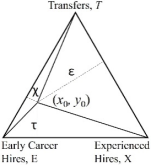
Figure 1. Equilateral Triangle graphical representation of an (Early Career, Experienced Career, Transfer) triplet.
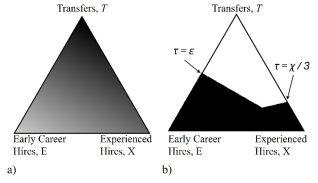
Figure 2. Graphical representation of a Metric such as experience or salary (a, left) and a Boundary Condition requiring sufficient mentors (b, right).
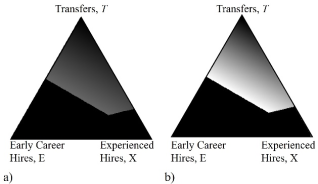
Figure 3. Multiplicative combination of the Metric (Figure 2a) and Boundary Condition (Figure 2b) Triangles (a). In (b), the gray scale is renormalized to highlight the minimum and maximum values.
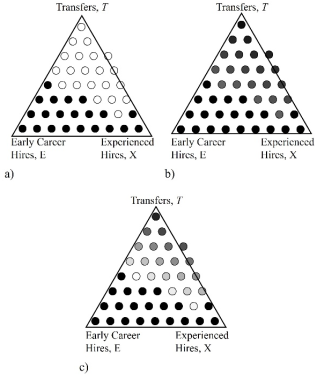
Figure 4. Graphical representation of a Metric (a, left) and a Boundary Condition (b, right) from Figure 2 with a low hire count. The combined triangle, Figure 4c, is the equivalent of Figure 3b. A black border was added to the circles in both plots in order to make the lighter circles clearer.
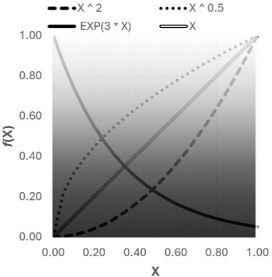
Figure 5. Examples of other mathematical functions that can be used for Metrics or Boundary Conditions.
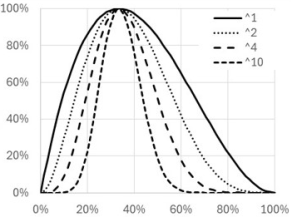
Figure 6. Plot of gray scale for Symmetric Synergy Formula, Equation (6), along the vertical axis (the Early Career-Experienced side of the triangle is 0% and the Transfers vertex is 100%.
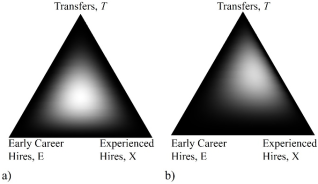
Figure 7. Plot of Symmetric Synergy with n = 2 (a, left) and Asymmetric Synergy with m = 1, n = 2, o = 3 (b, right).
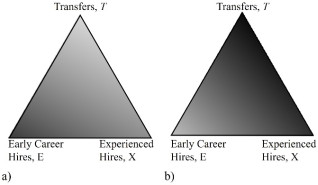
Figure 8. Annual Salaries per Unit Work at Time = 0 (a, left) and Time = 5 Years (b, right).
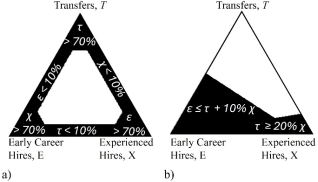
Figure 9. Examples of more complex Boundary Conditions of each value being between 10% and 70% inclusive (a) and requiring mentors by limiting t + 10% x >= e; t >= 20% x. The applicable Boundary Condition equations are shown in each section of (a) and (b).
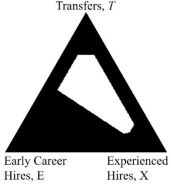
Figure 10. Combined Boundary Conditions from Figure 9 showing how quickly the possible hiring space can be reduced with seemingly reasonable conditions.
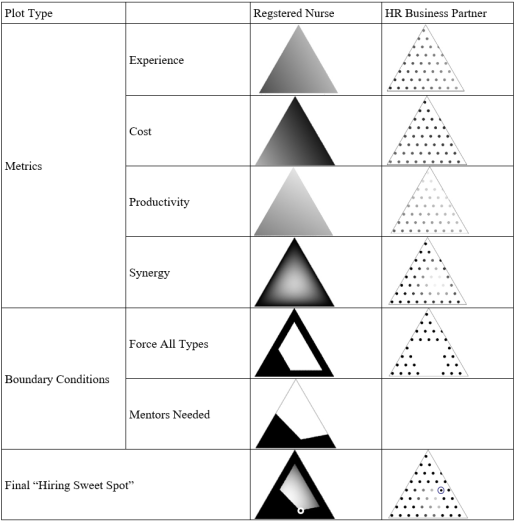
Figure 11. Full scale example using the Metrics and Boundary Conditions for a Registered Nurse and a Human Resources Business Partner as shown in Table 3. The “Hiring Sweet Spots” are shown as concentric black and white circles in the combination plots.
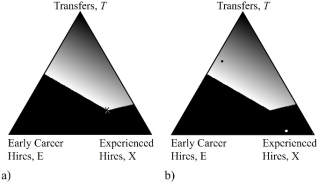
Figure 12. Over time, as the hiring process continues, the actual position in the hiring space shifts (from the “x” in a to the black circle in b). Consequently, a new target in the hiring space is needed (white square in b) so that the overall hiring remains at the calculated “Hiring Sweet Spot”.
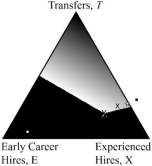
Figure 13. If the current position in the hiring space is not monitored and adjusted frequently enough, the current hiring position (white circle) might be so far from the “Hiring Sweet Spot” that a point outside the Triangle (black square) is needed to achieve the desired final hiring ratios. However, since this is not possible, a new future target (white star with a black border) can be determined to leave the final position in the hiring space (“x”) as close as possible to the initial “Hiring Sweet Spot”.

Information


 Share This Article
 Twitter
 Linked In
 Facebook
 Copy
Copy Download